
What is it?
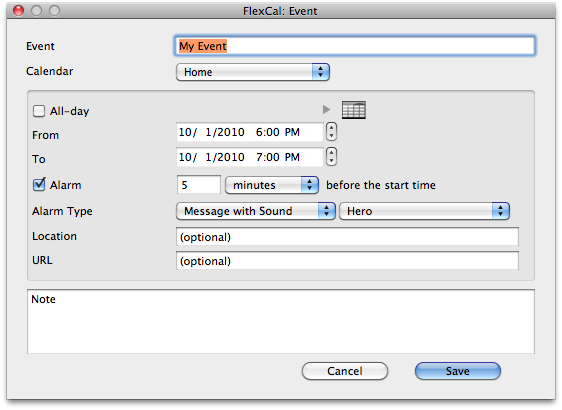
FlexCal is a simple way to get your tasks or events into your calendar quickly. Simply hit a hotkey (that you define) and a quick entry window pops up — from within any application. The first window is a task entry window. Hit the hotkey again and an event entry window appears. Type in your task or event, hit return and instantly the item is added to your iCal calendar. It’s that simple.
What’s the cost?
Free, but donations are greatly appreciated.
Requirements?
Requires Mac OS X 10.5 or later. Now supports 64-bit mode in 10.6 as well.
Feedback? Questions? Suggestions?
email us here. You can post a comment below as well.
Good Karma
If you like using FlexCal and want to see future releases, please consider donating. Your donations do make a difference to independent developers like us.
Download
Version History
Want it in your language? We need help with localization
These are complete:
☑ English
☑ Deutsch
☑ Français
☑ Italiano
☑ Español
☑ Nederlands
☑ Suomi
Click here if you can assist with translations
Need to uninstall?
Copyright © 2010 FlexGames, LLC. All rights reserved.


Entries (RSS)
First!!!
FINALLY!!! I’ve been searching for something like this and even tried to create those Automator actions with little success. Love the look and especially the hotkey. Is it possible to add two features: an ENTER key so we can tab to it or just hit enter; access the drop down calendar menu (I have 5 calendars) via TAB. thank you. Will donate.
Alex – the inability to tab between fields is not a limitation of this utility but rather a system setting in OS X.
To set it, go to System Preferences > Keyboard & Mouse > Keyboard Shortcuts > All Controls at the bottom (button).
Now you can tab between the controls in FlexCal and never take your hand off the keyboard. Can you clarify what you meant by an enter key? You can hit enter/return at any point in the to do or events window to add your to do/event.
[...] als mit FlexCal Termine oder Aufgaben in iCal einzutragen geht es kaum noch. Nach der Installation findet sich eine [...]
[...] ab OSX 10.3. Leichte Überarbeitungen und Bugfixes für: Delicious Library 2.0.4, Flux 1.4.7 und FlexCal 1.08. Autor:Datum:Kategorie:Tags: Nadine Dressler, Freier Mitarbeiter10.10.2008, 12:36 [...]
[...] täglichen Workflow einbinden werde, da es doch einiges an “Klicks” erspart. Links: FlexCal aptgetupdate.de Autor: Chris\Das3Zehn [...]
If you could tie in the ability to enter Events, ToDo’s & Mail Notes, that would be an awesome all in one complete system wide hotkey that would make jotting down info super quick.
Awesome, thank you
[...] den Kopflos-Blog sowie aptgetupdate.de bin ich auf ein nützliches Programm namens FlexCal gestoßen. Was macht dieses Programm? Es stellt eine Möglichkeit zur Verfügung, schnell und [...]
This is just what I’ve been looking for – thanks!
[...] FlexCal – is a simple way to get your to-dos or events into your calendar quickly. [...]
[...] muss das sein, per Tastenkombination kann man mit dem Tool FlexCal Termine und Events eintragen. bisher war das immer etwas umständlich. Erst iCal starten und [...]
[...] Entwickler Seite [...]
With people constantly popping in my office asking me to meet at some future date for something, I can load it into my calendar without asking them to hang on while I open iCal and forget half the information. This a really great app.
need more flexibility setting alarms (days before event instead of minutes, silent alarms)
[...] stellt die Freeware FlexCal vor, mit der man bequem mittels Hotkey hübsch einen Termin in iCal eintragen [...]
Hi there,
Nifty! But one biggish quirk: Apple+V doesn’t seem to work. Or Apple+A, or any of the other usual hotkeys.
Thanks
I usually add 2 alarms before a lot of events (ones out of the office). Is there a way to add a second alarm feature? I would pay for that.
Excellent work! wondering is possible to add attendees for events? thanks.
Thanks for your work. This is very helpful.
Would be perfect if there were note and URL fields for tasks.
Hi. Great app! Any chance you can add the alarm option to include “day” instead of only “minutes” before the event? If I want the alarm to remind me 1 day ahead I need to calculate how many minutes that is. Hurts my brain…
Thank you Joe !
It was a pleasure to do the translation with you.
It’s a wonderfull appli
@ tim : lol 1 day = 3600 min ^^
euh sorry 1440 …
[...] FlexCal è un modo semplice per creare ed inserire rapidamente attività o eventi nel tuo calendario. Basta premere una combinazione di tasti (da definire a proprio piacimento nelle opzioni) e una elegante finestra pop-up si aprirà. La prima è una finestra che vi permetterà di creare un’attività; premendo di nuovo il tasto di scelta rapida si creerà invece un evento. Completate la creazione inserendo le informazioni necessarie e premete immediatamente il tasto Invio e l’elemento appena creato viene aggiunto al tuo calendario su iCal. [...]
is there a version for 10.4 available. I’m not at all pleased whit 10,5 !
Unfortunately no, there is no 10.4 version available. The reason is that the utility uses a library (CalCalendarStore) that only exists in 10.5 or greater.
[...] Download FlexCal FlexCal is a simple way to get your tasks or events into your calendar quickly (tags: software freeware mac timemanagement) [...]
I’m a neophyte. To install Flexcal, do I just drag it into /Library/Prefpanes? If not, how do I install this?
Also, how do I assign assign a hotkey?
Thank you,
Alan
No problem. Just doubleclick the utility – it will automatically install it for you (as a preference pane). There is a background app called flexcalhelper that handles the rest for you as well. You assign the hotkey in the first pane of the preference pane that loads after you doubleclick it. Let me know if you have any other questions.
I’ll probably try to add this for the 1.14 release.
Thank you. That was rather simple, and everythin works just fine.
I don’t know how I botched this the first time, but I suspect I missed the greyed out portion where you select the hot key on the helper screen.
Thanks again.
Alan Gann
Excellent app! I believe you are near the development of a Mac PIM app that can bring together the ease and functionality that Apple has ignored in this category. Instead of using separate apps for mail, ical, tasks, notes, and address book, I can envision FlexCal acting as the front end for all of these Apple apps. So, to make FlexCal even more perfect, can you add:
1. An additional field on the Tasks screen for Notes related to each task record?
2. Alarms/Reminders (both single and recurring) for minutes, hours, days, weeks in both Tasks and Events.
3. An entry screen for mail.app’s Notes.
4. An entry screen for Address Book.
5. An entry screen for new mail or at least a link to mail.
These additions would make FlexCal a truly valuable front end for the integrated Organizer/PIM functions I have, surprisingly, found lacking from Apple.
Your download link appears to be broken or referring to an incorrect file ;(
I agree with Rob’s post – just loaded this, but it is well designed and would make a great PIM especially if it was customizable by the users’ preference for which apps are accessible. Will give it a few days to become indispensable, donate also – thanks for this elegant solution!
I agree with Arthur who agrees with Rob…..
I will gladly donate to this app ….. Hell I’ll PAY for this app with that functionally…..
[...] FlexCal. Benutze ich dank Things derzeit relativ wenig, ist aber eine sinnvolle Ergänzung von iCal, die das Anlegen von Aufgaben und Terminen durch Tastaturkürzel jederzeit erlaubt. Schneller hat man seine Termine nicht eingetragen. [...]
When I first saw a review of FlexCal I was new to the Mac and didn’t understand what it was offering. Today I saw a “reminder” of that review a year ago and decided to try it. It is a very handy utility. I would have two suggestions, however, should you issue future iterations of the program: 1) allow the alarms to be set in increments greater than minutes (I usually set reminders a day ahead. (Who wants to do the math?
); 2) allow documents to be associated with the calender events, just as as iCal does. I usually associate documents that are formal notices of the calendared events and use those documents during the event itself. Except in these minor ways, FlexCal is nearly perfect for my needs; without them, I might as well start up iCal itself.
Before I try any program, I always read the comment section first and I just wanted you to know that this is the BEST comment section I have read in years. Your customers are very helpful in their suggestions and your responses are informative and your updates seem to be spot on per customer requests.
I’ll be downloading the program and yes I always donate to developers whose programs I use.
More alarms and alarm options like the ones existing in ical would make this the best little utility ever that I would be willing to pay for. Still, pretty awesome! Thanks.
Also a keyboard shortcut to close the window would be nice……
Escape will close the window by default.
Command-V and Command A are reserved by Apple, which is why you cannot use them. We don’t want to take over existing common hotkeys.
Is it possible to automate this with Applescript? I want iCal to launch a script that will bring up FlexCal, but no matter what I try, I cannot do it. Is there some way to do it that I don’t know about?
@ Confused Programmer
You could use GUI scripting. For example, if you have set FlexCal to be triggered by pressing ⌘F6, the following one line Applescript will do that for you:
tell application “System Events” to key code 97 using {command down}
You can find out the appropriate key code number for any key on your keyboard using a little utility called Full Key Codes (http://softwares.bajram.com/utilities/). You will want the decimal code, which is shown in blue in the lower right of the window.
Alternatively, if you are using a normal alphanumeric key in your FlexCal shortcut, you can use the keystroke command instead of the key code command. So if your FlexCal shortcut is ⌃⌥⇧⌘T, the following script will work:
tell application “System Events” to keystroke “t” using {command down, control down, shift down, option down}
Hi! I don’t know what’s happening but
1. I can’t uninstall Flexcal. I use the application to uninstall and it does something but when I go to system preferences flexcal is still there.
2. The reason I am trying to uninstall it is because I start flexcal in system preferences and it gets stuck launching flexcal. It has been doing it for about 20 minutes so far.
I can’t seem to be able to get this running.
Help please.
Hey,
Great tool, but would be nice that it automatically saves data if window disappears, and will there be a 64-bit one soon?
I have been using flexcal for about a year and I love it. Unfortunately, it won’t work since I installed snow leopard.
Please comment.
norman radway
Norman, your experience is not typical. It runs in Snow Leopard without a problem.
Sehr nützliches Tool, Danke. Gibt es eine Möglichkeit Termin auch als “privat” zu markieren?
Is it possible to mark events with the “private” tag? Thank You.
any 64-bit verson coming soon? Can;t wait. And please have it save appointments automatically, not after hitting return in the title field. I lose too many appointments just pressing the disappear button on the top-left corner. iCal saves everything as it is written;FlexCal really should do the same.
still no 64-bit version? Is this a forgotten app? It’s too usefl to ignore, but please update.
Here’s looking at you, kidd.
“Norman, your experience is not typical. It runs in Snow Leopard without a problem.”
admin: yes, it does work on SL, but only in 32-bit, and there are some funny glitches that could use some ironing out, eg: saving entry on the fly, like iCal does, so that if you click somewhere outsdie the window and it disappears, the information typed is stored, as opposed to needing an enter key pressed in the title field to confirm saving.
Wow, just found this gem, and really impressed. It does exactly what I need and no more.
I see some ideas for tweaks, but the one thing I wanted to ask is: is there a 64-bit version in the works?
Thanks in advance,
Zig.
This program seemed to be just what I was looking for – but like Norman, I find it won’t run on my 10.6 machine. Clicking “Start FlexCal” leads to the “Launching FlexCal…” message appearing indefinitely, and the assigned shortcut never starts working. Any known conflicts with other add-ons (Butler, etc.)?
I will try again if an update appears – and I’d be happy to donate if I can get it working!
Thanks,
Alistair
Fantastic app! I only have one request…is there a setting that would allow me, once Flex is triggered, to choose between Task or Event? I do both frequently and that flexibility would be awesome.
Thanks for putting this together! I donated and hope others do the same!
Wow…amazing what you can do when you actually read the small black print! Sorry for not paying close attention…I found the toggle between Task and Event! Thanks again!
[...] requires a rather lengthy process, including keeping it open at all time. Luckily, there’s FlexCal. This small application which reside in the System Preferences is designed to overcome that very [...]
Love the application, but I recently switched to the CalDav method of syncing with Google calendar, and now flexcal does not recognize the delegate calendars, only the main one. this means I can only add events to the main calendar and not the delegates.
Bbjonz – thanks for the feedback. We are working on delegate support for the next release.
Sorry, but I can’t figure out how to install. I double click on the download, and it tells me it will be added to the Preference Pane, so I allow it to install, but I still do not see it in System Preferences…what am I doing wrong?? Please help.
Nice and easy to use. Well done.
Love the idea. Unfortunately doesn’t work for me. Have tried repeatedly to add an event. Half the time hitting return to confirm the event has no effect at all. Other times it closes the Flexcal entry window but doesn’t enter the event in iCal. It is, I suspect, to do with 10.6 & possibly other application conflicts. Having just acquired a new version MacBook Pro, 10.6 seems to be buggy as billyo. I suspect that is related to running my legacy non-Intel apps. If anyone knows a workaround I’d be grateful to hear of it
Another vote for adding a drop down box to change the alarm increments to minutes, hours, or days like the drop down for the calendars.
Would be great if there was a way to uninstall without an uninstaller that requires Rosetta.
If you don’t want to use the uninstaller with Rosetta, you can simply right click the system preference and hit remove. The next time you log out and back in it will be completely uninstalled.
I’ve got “Start FlexCal at login” checked but… it doesn’t. Anyone else seeing this, or know how to fix it? Running Snow Leopard.
Otherwise everything works as expected, although it would be nice if the window didn’t just vanish with anything I typed disappearing into the ether if I activate another application (like, to copy details for pasting into the Notes field) before finishing.
This is informative post. Thanks for the excellent article you shared! I was looking for this information for quite some time, but I wasn
[...] email us here. You can post a comment below as well. [...]
If you doubleclick the preference pane, it will ask you if you want to install it (you can choose to install it for all users of the computer or just yourself). Once you have done this, you will see a section in the opening window of the preference pane to set your hotkey. Just click the section that says “click to set a hotkey” and then type your hotkey. Let me know if you have any questions.
[...] FlexCal Main Site:http://flexgames.com/flexcal/?p=1 [...]
@ MiGrant. Same here (Snow Leopard) : checked to start at login but it doesn’t. I wouldn’t know how to fix it.
Oops, just noticed : if I restart System Preferences (as suggested by FlexCal), my app window title says “System Preferences 32-bits”.
So should we assume a compatibility issue with SL 64-bits ?
If you want you can try going to System Prefs->Accounts, then to login items. Remove any trace of FlexCal there. Then back in the FlexCal System Pref, uncheck and recheck the start at login checkbox. That may work. FYI – this is fixed in the upcoming 1.14 release.
This is correct. v1.13 was 32 bit only. The upcoming 1.14 release is, among other things, 64-bit enabled.
The start at login bug is fixed in 1.14. 1.14 is also 64-bit enabled. Go download it (or upgrade to it) folks!